| Table of Contents |
|---|
System configuration navigation
| Configuration area | System configuration ID in translate5 |
|---|---|
| File formats | runtimeOptions.import.xlf.placeablesXpathes |
Versioning
Excerpt Include Version and versioning Version and versioning nopanel true
| Change History | ||
|---|---|---|
|
What are XPaths?
XPath stands for “XML Path Language”. It is a query language that can be used to e.g. select, filter and analyse specific elements, attributes or text content within an XML document.
The XPath expression in the .xml block below on the left specifically targets the “PowerScan 3000” text passage, which should not be translated, but rather directly taken over into the target text.
|
|
Identifying placeholders (placeables) in files during import with XPath expressions
First of all: you can use this feature for inline tags originating from various source file formats. In most cases, these would be XML files. However, in translate5, these files are first sent to Okapi for format conversion, and Okapi returns XLIFF 1.2. The process described below is based on these returned XLIFF files.
Placeables are usually marked by internal tags, allowing translate5 to recognize them in the unmasked content of an internal tag when importing Xliff files. The XPath expressions are interpreted relative to the content of the tag, which serves as the root context, rather than relative to the entire document.
If an internal tag is identified as a placeholder, it receives an additional “class” attribute with the designation “t5placeable” and the referenced content is saved in a data property: data-t5content="something".
The placeholder passages are then displayed as protected tags in the editor. However, in such a way that the translator can display them using full tag view.
The following file was used for this example: placeables_example.xliff
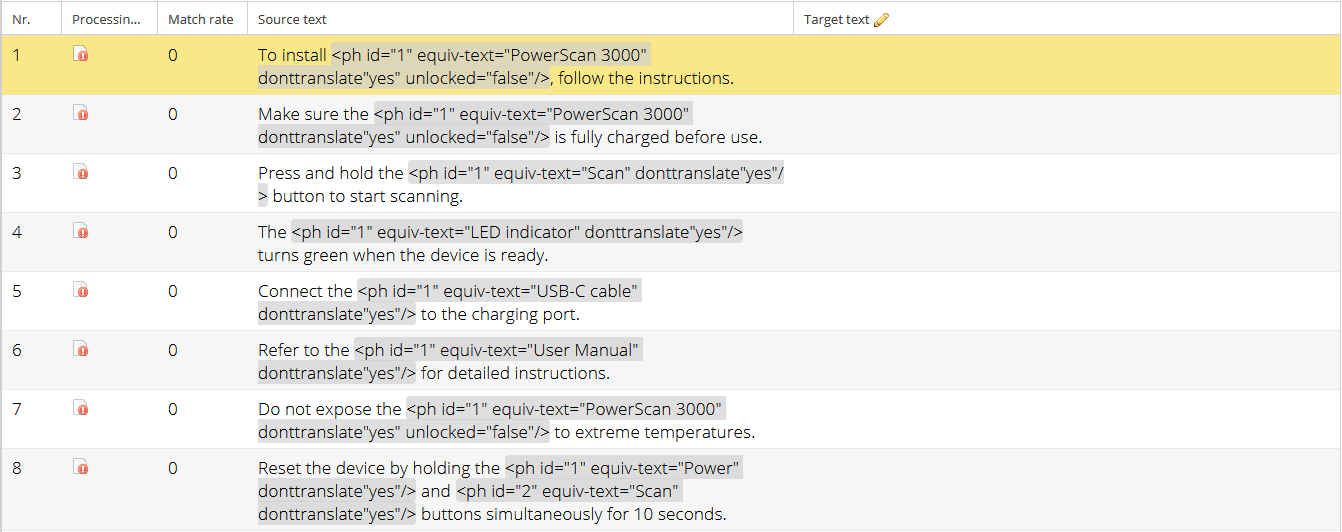
Examples for XPath-Rules
- Generally, Placeables can be created by referencing the XLIFF-tags in the segment directly OR by referencing the markup that is replaced by the XLIFF-Tag (note: not all XLIFF-Tags replace markup).
- The XPath must reference a text, if the XPath cannot be found or the referenced text is empty, no Placable is created and the Tag is shown as a "normal" internal tag
| XLIFF Tag | XPath | Referenced Text | Notes | ||||
|---|---|---|---|---|---|---|---|
|
| Product XYZ | Referencing a Placeholder (ph-tag) coming from Across | ||||
|
| Some NAME | Referencing the Markup wrapped by a placeholder (ph)-tag. Note, the referenced markup is escaped | ||||
|
| Headline | Referencing the Markup wrapped by a isolation (it)-tag. Note, the referenced markup is escaped |
If translate5 does not recognize all placeables in your Xliff files, you can go to the system configuration > “File formats” > “XLIFF Import: Placeables detection XPaths” to insert the XPath expressions that match your placeables.
| These settings can be overwritten during import and at client level. |
|---|

Application in translate5

If translate5 does not recognize all placeables in your Xliff files, you can go to the system configuration > “File formats” > “XLIFF Import: Placeables detection XPaths” to insert the XPath expressions that match your placeables.
| These settings can be overwritten during import and at client level. |
|---|